

If you’re wondering how to unlist products in Shopify, the platform has introduced a new product status called “Unlisted” that gives merchants greater control over how and where their products appear across their online store and sales channels.
What is the Unlisted Product Status?
The Unlisted status is a new visibility option that allows merchants to hide products from multiple discovery points while maintaining accessibility through direct links. When a product is set to Unlisted, it becomes invisible in:
- Store search results
- Product collections
- All connected sales channels
- Internet search engines (Google, Bing, etc.)
- Shopify Catalog
However, customers can still access and purchase these products if they have the direct product URL.
Ideal Use Cases
This feature is particularly useful for several business scenarios:
- Private sales: Products intended for specific customer groups or VIP access
- Warranty items: Replacement products that should only be accessed by eligible customers
- Add-on products: Supplementary items meant to be purchased alongside main products
- Free gifts with purchase: Promotional items that shouldn’t be discovered or purchased independently
- Exclusive offers: Limited-time deals shared only via email or direct messaging
- B2B products: Items reserved for wholesale or specific business customers
How to Unlist Products
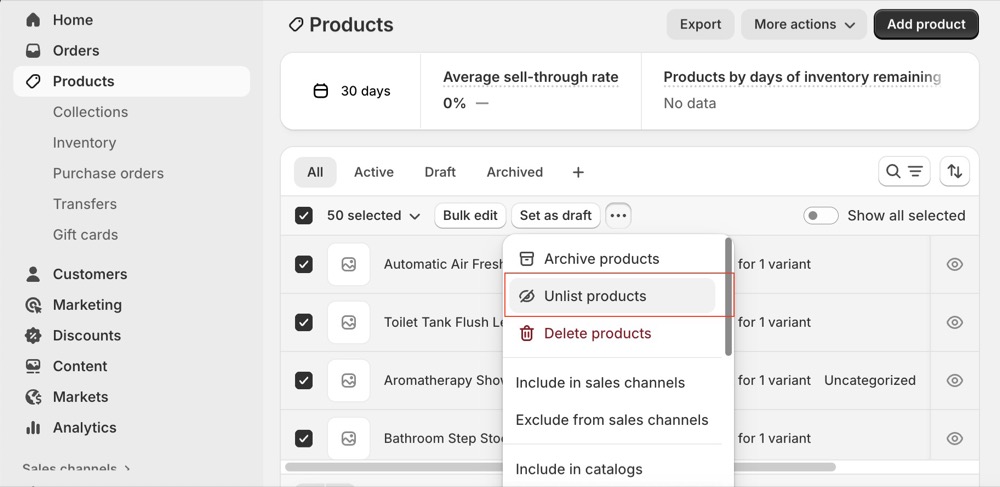
Setting products to Unlisted status is straightforward:
- Log in to your Shopify admin panel
- Navigate to the Products section
- Select one or multiple products using the checkboxes
- Click the three-dot menu button
- Select Unlist products
The process works for both individual products and bulk selections, making it efficient for merchants managing large inventories.
Why This Feature Matters
Before the Unlisted status, merchants had limited options: products were either Active (visible everywhere) or Draft (not purchasable). The Unlisted status fills a crucial gap by allowing products to remain fully functional and purchasable while controlling their discoverability.
This gives merchants more flexibility in their marketing strategies, enabling them to create exclusive buying experiences without complex workarounds or third-party apps.
FAQs
Can I Use Unlisted Status for Specific Variants?
No, the Unlisted status applies to entire products only, not individual variants. If you need to hide specific product variants (such as a particular size or colour option), you’ll need to use alternative methods:
- Third-party apps designed for variant management
- Custom Liquid code modifications to your theme
- Inventory settings (setting quantity to zero with “continue selling when out of stock” disabled)
The Unlisted feature is designed for hiding complete products whilst maintaining purchase functionality through direct links, not for managing variant-level visibility.
Author

