
AI tools such as ChatGPT, Perplexity, Claude and Gemini can send visitors to your site after showing your content in an answer. GA4 does not label those sessions as AI traffic by default, but you can separate them by filtering the page referrer dimension.
This gives you an early view of which AI platforms are sending visits, which pages they point to, and how that traffic compares with organic search. If you are tracking wider AI search trends, this sits alongside the patterns covered in our article on AI search’s share of web traffic.
Why track AI chatbot traffic?
Tracking AI chatbot referrals helps you answer three practical questions:
- How quickly AI referral traffic is changing alongside traditional organic traffic
- Which AI search or chatbot platforms send visitors to your site
- Which pages earn clicks after being included in AI-generated answers
Those signals will not replace SEO reporting, but they add context that standard channel groupings can miss.
Set up AI traffic tracking in GA4
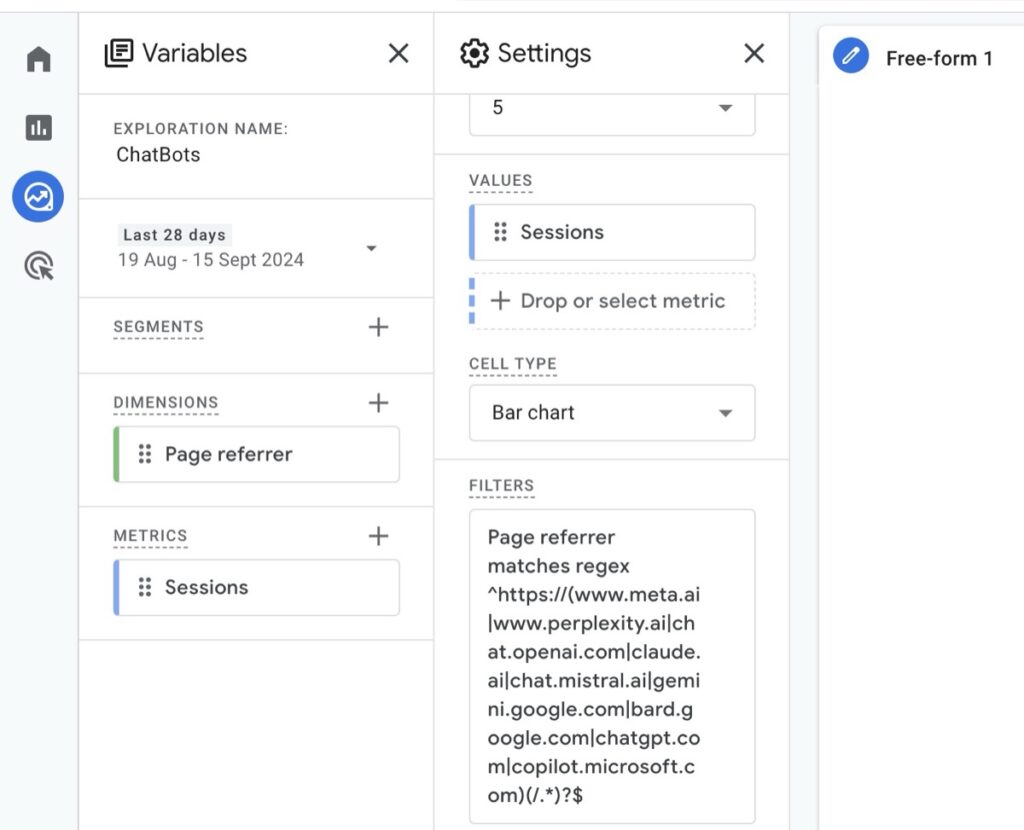
You can build this as an exploration in Google Analytics 4:
- Create a new exploration.
- Set
page referreras your dimension. - Use
sessionsas your metric. - Add
sessionsas your value. - Apply this regex match filter:
^https:\/\/(www.meta.ai|www.perplexity.ai|chat.openai.com|claude.ai|chat.mistral.ai|gemini.google.com|bard.google.com|chatgpt.com|copilot.microsoft.com)(\/.*)?$This filter captures referrals from the listed AI chatbot and AI search domains. Treat it as a maintained list, not a complete measurement system. New platforms may appear, old domains may change, and some tools may route traffic in ways that do not expose a stable referrer.
Add more detail to the report
Once the basic report is working, add dimensions that show where AI-referred visitors land and how they behave. Useful additions include:
- Landing page + query string: shows which URLs receive AI referrals.
- Session source/medium: helps compare AI referrals with other acquisition sources.
- Total users: separates user volume from session volume.
- Views: shows whether AI-referred visits continue beyond the landing page.
Use these fields to spot pages that already appear in AI answers, then compare their engagement with equivalent organic search traffic.
Keep the referrer list maintained
The regex is only as accurate as the domains it includes. Review it regularly and add platforms when you see new AI referral sources in GA4 or server logs. Keep older domains such as bard.google.com only if they still appear in your data.
The useful takeaway is simple: GA4 can track AI chatbot traffic when the platform passes a referrer. Start with a clear exploration, monitor the domains over time, and treat the data as directional rather than complete.
Author