
Introducing the WordPress Command Palette
According to the latest WordPress developer update, WordPress has expanded the Command Palette to work across the entire admin interface, not just in the Site Editor.
If you spend a lot of time managing your WordPress site, you know how many clicks it can take to navigate between different admin sections. The Command Palette acts like a search engine for your admin area, allowing you to jump directly to any screen with just a keyboard shortcut and a few keystrokes.
How to Access and Use the Command Palette
- Go to WordPress Admin Dashboard
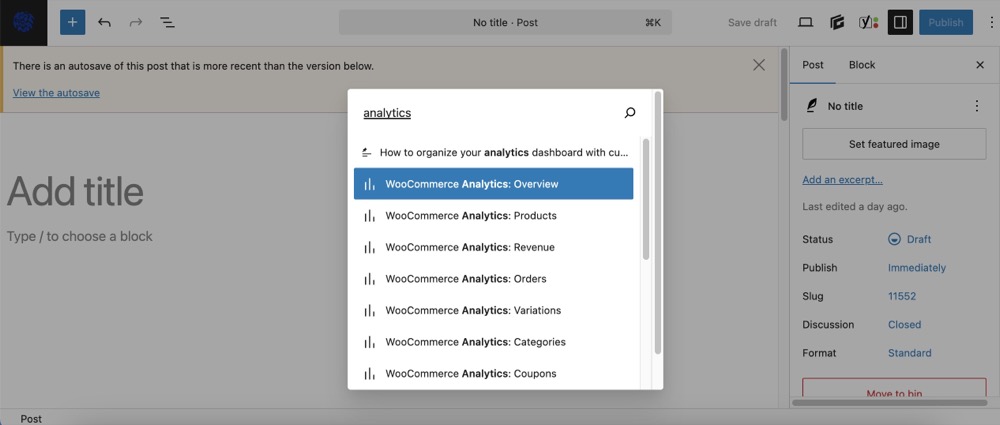
- Invoke the command palette with Cmd + K (Mac) or Ctrl + K (Windows)
- Type your search term in the command palette that appears
- Select from the matching results to navigate directly to that screen
With just a keyboard shortcut and a quick search, you can navigate anywhere in your WordPress admin.
Conclusion
The Command Palette is one of those features that, once you start using it, you’ll wonder how you managed without it. It transforms the WordPress admin experience from a click-heavy interface to a streamlined, keyboard-driven environment that respects your time and improves your workflow.
Give the Command Palette a try today by pressing Ctrl+K (or Cmd+K on Mac) from anywhere in your WordPress admin. Your productivity will thank you! For more information, visit the WordPress developer news page.
Author